
Intro
If you’re looking to master data handling and Retrieval-Augmented Generation (RAG), check out Module 2 of my “Machine Learning in Production” course!
I was always afraid of the long and complicated process of handling data: different OCRs, various loaders for complex documents, and the chaos of how people store their data – sometimes it’s what keeps me awake at night.
But not anymore! Today, we’ll explore how to simplify data loading into your systems using LanceDB, Modal, and visual LLMs (ColPali and Phi-3.5-vision).

If you’re impatient, here’s the full code to dive right in. For everyone else, let me tell you a story.
Context
Okay, let’s build some RAG (Retrieval-Augmented Generation) system:

Reference: Building RAG-based LLM Applications for Production
It should be relatively easy; RAG and IR (Information Retrieval) have existed for a while, and there are many good references on how to implement them. Let’s start with data ingestion.

Reference: Building RAG-based LLM Applications for Production
That’s easy! Just five rectangles and four arrows – I can do this!

Let’s load, chunk, and… and… Oh, wait a second!
But what if my data looks like this?

Reference: ViDoRe Benchmark
Or like this?

Reference: ViDoRe Benchmark
Or even like this?!

Reference: ViDoRe Benchmark
Gosh, I wish I understood what it means! But you get the idea. Sometimes, you need to work with data that is structured like a Big Ball of Mud.

Reference: Big Ball of Mud.
So, what’s the takeaway?

It looks like the five rectangles are a little bit misleading in my case!
But I follow a lot of smart people on X/Twitter and know about OCR and different processing techniques! One nice repo that has all those together: PDF-Extract-Kit

Reference: PDF-Extract-Kit
It has:
- Layout Detection with LayoutLMv3
- Formula Detection with YOLOv8
- Formula Recognition with UniMERNet
- Table Recognition with StructEqTable
- Optical Character Recognition with PaddleOCR.
So now we need to experiment and set up all those models, adjust their parameters, and find the right combinations that work best for us. Sounds complex to me. Looks like I need to hire an intern for this because I’m too lazy to do it myself!
But, but, just hear me out, okay – what if I treat the PDF as a bunch of images?

Interesting! I guess there should be some development there! And there is! Meet ColPali models!
Huge thanks to Jo Kristian Bergum and his amazing blog post about it PDF Retrieval with Vision Language Models.
Vision retrieval
So what’s the deal? Very short:

Reference: ColPali
Instead of complex PDF preprocessing, let’s embed a PDF page as an image with the help of a neural network. And not embed all at once, but split by patches and embed each patch.

Reference: Beyond Text: The Rise of Vision-Driven Document Retrieval for RAG
Does it work? Yes!

Reference: ColPali
Apparently, on complex datasets, no matter how you process:
- Just get text out of the PDF
- Text out of the PDF + OCR
- Text out of the PDF + captioning
- Embedding at the image level
ColPali gives you better performance in all cases!
Let’s dive deep into how exactly each image processes. Remember this?
Reference: Beyond Text: The Rise of Vision-Driven Document Retrieval for RAG
For each image, we are going to have 1030 patches with 128 floats each; in total, 131840 numbers.
And for each query, we are going to have several patches with 128 floats each. For example, for the text “All documents with arrival notice”: 14 patches with 128 floats each.

This makes embedding from ColPali a little bit more complicated to work with, other than a simple one-dimensional embedding. So we are going to use ColPali as a reranker rather than a full ANN (approximate nearest neighbor search).
It’s very similar to ColBERT, which you can tune to achieve amazing speedups and adapt to do full ANN: more details here: Stanford XCS224U: NLU I Information Retrieval, Part 4: Neural IR I Spring 2023.
But in this work, we are going to use ColPali as a reranker.
I hope I convinced you to at least try ColPali in case you are dealing with complex PDF documents. Enough talk – let’s jump into the code!
Core
The stack I am going to use.

Let’s start with ColPali:

To extract embeddings from PDFs and queries, we are going to use the next 2 functions:
def get_pdf_embedding(pdf_path: str, model, processor):
    page_images, page_texts = get_pdf_images(pdf_path=pdf_path)
    page_embeddings = []
    dataloader = DataLoader(
        page_images,
        batch_size=2,
        shuffle=False,
        collate_fn=lambda x: process_images(processor, x),
    )

    for batch_doc in tqdm(dataloader):
        with torch.no_grad():
            batch_doc = {k: v.to(model.device) for k, v in batch_doc.items()}
            embeddings_doc = model(**batch_doc)
            page_embeddings.extend(list(torch.unbind(embeddings_doc.to("cpu"))))
    document = {
        "name": pdf_path,
        "page_images": page_images,
        "page_texts": page_texts,
        "page_embeddings": page_embeddings,
    }
    return document


def get_query_embedding(query: str, model, processor):
    dummy_image = PIL.Image.new("RGB", (448, 448), (255, 255, 255))
    dataloader = DataLoader(
        [query],
        batch_size=4,
        shuffle=False,
        collate_fn=lambda x: process_queries(processor, x, dummy_image),
    )
    qs = []
    for batch_query in dataloader:
        with torch.no_grad():
            batch_query = {k: v.to(model.device) for k, v in batch_query.items()}
            embeddings_query = model(**batch_query)
        qs.extend(list(torch.unbind(embeddings_query.to("cpu"))))
    q = {"query": query, "embeddings": qs[0]}
    return q
Great! Now we need to store them and search over them. For this, I am going to use LanceDB.

I love this database because of its simplicity and underlying lance format. But the main killer feature for me is its flexibility in storage selection and strong compute/storage separation — I can use LanceDB as a Python library and rely on object storage, such as S3 or Minio, for persistence automatically, more on this here!
Let’s define how we are going to create database:
def create_db(docs_storage, table_name: str = "demo", db_path: str = "lancedb"):
    db = lancedb.connect(db_path)
    data = []
    for x in docs_storage:
        sample = {
            "name": x["name"],
            "page_texts": x["page_text"],
            "image": get_base64_image(x["page_image"]),
            "page_idx": x["page_idx"],
            "page_embedding_flatten": x["page_embedding"].float().numpy().flatten(),
            "page_embedding_shape": x["page_embedding"].float().numpy().shape
        }
        data.append(sample)

    table = db.create_table(table_name, data, mode="overwrite")
    return table
And here’s how to search:
def search(query: str, table_name: str, model, processor, db_path: str = "lancedb", top_k: int = 3):
    qs = get_query_embedding(query=query, model=model, processor=processor)
    db = lancedb.connect(db_path)
    table = db.open_table(table_name)
    # Search over all dataset
    r = table.search().limit(None).to_list()

    def process_patch_embeddings(x):
        patches = np.reshape(x['page_embedding_flatten'], x['page_embedding_shape'])
        return torch.from_numpy(patches).to(torch.bfloat16)

    all_pages_embeddings = [process_patch_embeddings(x) for x in r]

    retriever_evaluator = CustomEvaluator(is_multi_vector=True)
    scores = retriever_evaluator.evaluate_colbert([qs["embeddings"]], all_pages_embeddings)

    top_k_indices = torch.topk(scores, k=top_k, dim=1).indices

    results = []
    for idx in top_k_indices[0]:
        page = r[idx]
        pil_image = base64_to_pil(page["image"])
        result = {"name": page["name"], "page_idx": page["page_idx"], "pil_image": pil_image}
        results.append(result)
    return results
Last but not least, I want to answer questions based on user queries and images – so we are going to use Phi3.5 Vision for this.

def run_vision_inference(input_images: PIL.Image, prompt: str, model, processor):
    images = []
    placeholder = ""

    # Note: if OOM, you might consider reduce number of frames in this example.
    for i in range(len(input_images)):
        images.append(input_images[i])
        placeholder += f"<|image_{i + 1}|>\n"

    messages = [
        {"role": "user", "content": f"{placeholder} {prompt}"},
    ]

    prompt = processor.tokenizer.apply_chat_template(messages, tokenize=False, add_generation_prompt=True)

    inputs = processor(prompt, images, return_tensors="pt").to("cuda:0")

    generation_args = {
        "max_new_tokens": 512,
        "temperature": 0.2,
        "do_sample": True,
    }

    generate_ids = model.generate(**inputs, eos_token_id=processor.tokenizer.eos_token_id, **generation_args)
    # remove input tokens
    generate_ids = generate_ids[:, inputs["input_ids"].shape[1] :]
    response = processor.batch_decode(generate_ids, skip_special_tokens=True, clean_up_tokenization_spaces=False)[0]
    return response
So, it looks like we have all the core functions for our RAG application. See the full core code here.
And if you want to jump in quickly, feel free to start with this notebook: quick-start.ipynb
Vibe
So, we saw the benchmarks, but as a rule of thumb, never trust them blindly – let’s do a small vibe check and see how it works.
For this example, I am going to use The InfraRed Report. It’s a great read with 56 pages of mostly infographics and plots about best infrastructure companies. Let’s see how ColPali and LanceDB handle this.
My first question would be: “How do training costs change over time?”
So the most relevant image based on ColPali embeddings is (page 14 The InfraRed Report):

And system response is:
The training costs for stable diffusion decrease over time, as shown in the graph. The costs start at $600,000 in September 2022 and decrease to $50k by March 2023.
Not bad!
Next, let’s check “How do SaaS vs. Infra companies perform?
So the most relevant image based on ColPali embeddings is (page 34 The InfraRed Report):

And the system response is:
Based on the images provided, Infra companies are performing better than application software companies. The first image shows that Infra companies have higher market capitalization, faster NTN revenue growth, and higher NDR compared to application software companies. The second image shows that 52% of respondents guided above consensus for infrastructure software, while only 27% guided above consensus for application software.
And finally, let’s ask “Best companies for model inference?”
So the most relevant image based on ColPali embeddings is (page 17 The InfraRed Report)
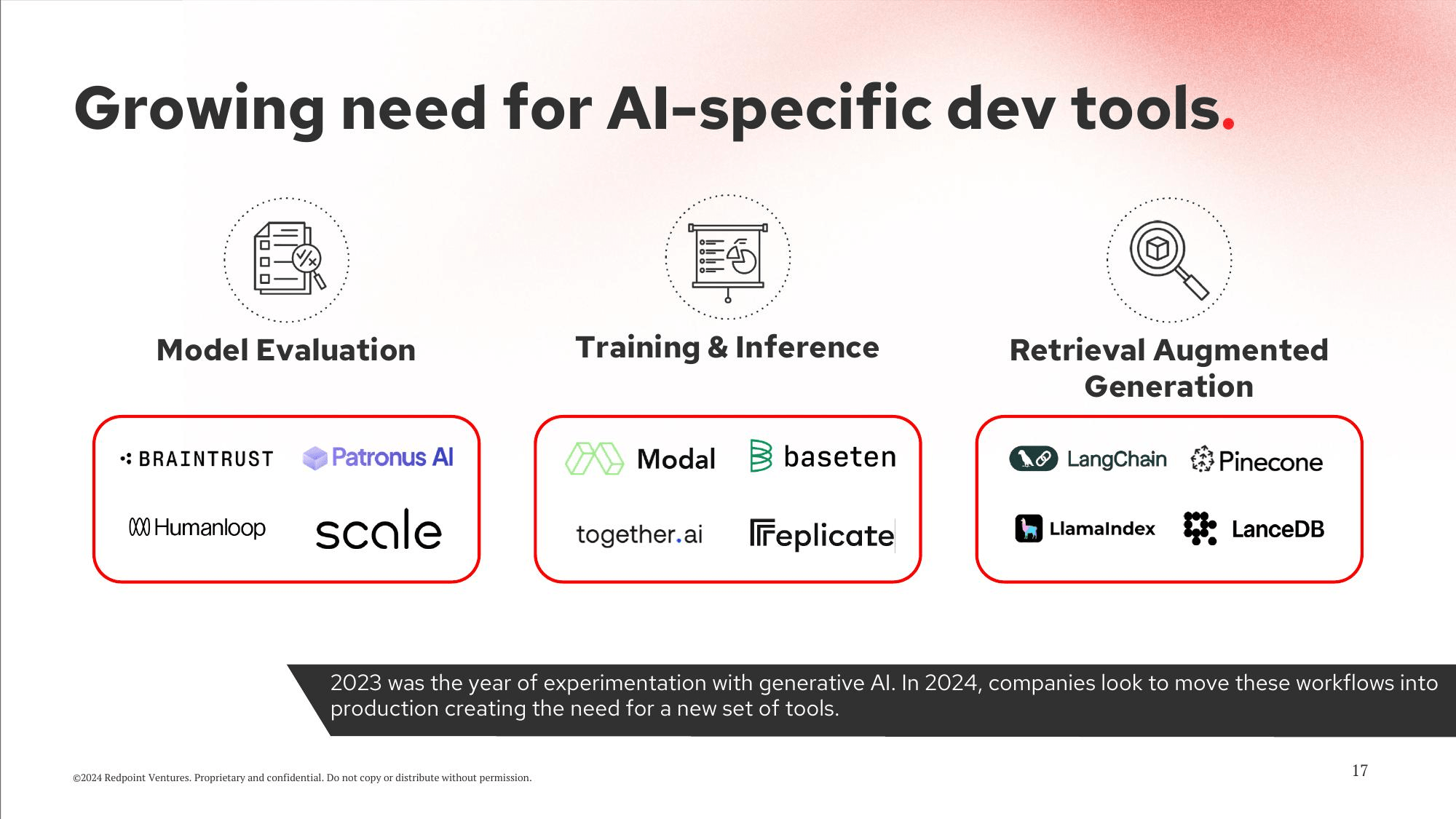
Based on the image, the best companies for model inference are Modal, baseten, and LanceDB.
Nice! Looks like we already using LanceDB!
Infra
Speaking of infrastructure, I’m not a big fan of notebooks, so let’s put everything together and run it on a GPU with the help of Modal. This is not only because ColPali and Phi3.5-vision recommended it, but also because I’ve used it a lot.

Here is my full code for infra-related tasks:
@app.cls(
    gpu="a10g",
    ....
)
class VisionRAG:
    @modal.enter()
    def load(self):
        from vision_retrieval.core import get_model_colpali, get_model_phi_vision
        model_colpali, processor_colpali = get_model_colpali(base_model_id="/model-paligemma-3b-mix-448")
        model_phi_vision, processor_phi_vision = get_model_phi_vision(model_id="/model-phi-3.5-vision-instruct")
        self.model_colpali = model_colpali
        self.processor_colpali = processor_colpali
        self.model_phi_vision = model_phi_vision
        self.processor_phi_vision = processor_phi_vision

    @modal.method()
    def ingest_data(self, pdf_urls: List[str], table_name: str, db_path: str):

        print("1. Downloads PDFs")
        from tqdm import tqdm
        from vision_retrieval.core import create_db, download_pdf, embedd_docs
        pdfs = []
        for pdf_url in tqdm(pdf_urls):
            pdf_file_name = download_pdf(url=pdf_url)
            pdfs.append(pdf_file_name)
        print(f"result pdfs = {pdfs}")

        print("2. Generating embeddings")
        docs_storage = embedd_docs(docs_path=pdfs, model=self.model_colpali, processor=self.processor_colpali)

        print(f"result docs = {len(docs_storage)}")

        print("3. Build vectorDB")
        create_db(docs_storage=docs_storage, table_name=table_name, db_path=db_path)
        print("Done!")

    @modal.method()
    def query_data(self, user_query: str, table_name: str, db_path: str):
        from vision_retrieval.core import run_vision_inference, search

        print("1. Search relevant images")
        search_results = search(
            query=user_query,
            table_name=table_name,
            db_path=db_path,
            processor=self.processor_colpali,
            model=self.model_colpali,
        )
        print(f"result most relevant {search_results[0]}")

        print("2. Build prompt")
        prompt = f"""
        Below is a user query, I want you to answer the query using images provided.
        user query:
        {user_query}
        """

        print("3. Query LLM with prompt and relavent images")
        response = run_vision_inference(
            input_images=[search_results[0]['pil_image']], prompt=prompt, model=self.model_phi_vision, processor=self.processor_phi_vision
        )
        print(f"response = {response}")
        return {"response": response, "page": search_results[0]['page_idx'] + 1, "pdf_name": search_results[0]['name']}
This class has just a load function that initializes models and 2 main functions: ingest_data and query_data. In both cases, they run on GPU via the Modal Lab platform.
Note: You need an HF token to pull ColPali and AWS credentials for persisting LanceDB on S3.
Here is how my dashboard looks after multiple ingestions and data retrievals.

Full infra code you can find here.
Repeat
Finally, I like to automate most of my data ingestion, and Dagster is one of my favorite tools for this:

Here is how I structure my pipeline as a set of assets.
import lancedb
import modal
from dagster import AssetExecutionContext, MetadataValue, asset

....

@asset(group_name="ingest", compute_kind="python")
def pdf_corpus(context: AssetExecutionContext):
    pdf_urls = [
        "https://vision-retrieval.s3.amazonaws.com/docs/InfraRedReport.pdf",
    ]
    context.add_output_metadata(
        {
            "len": MetadataValue.int(len(pdf_urls)),
            "sample": MetadataValue.json(pdf_urls),
        }
    )
    return pdf_urls


@asset(group_name="ingest", compute_kind="modal-lab")
def pdf_embeddings_table(context: AssetExecutionContext, pdf_corpus):
    VisionRAG = modal.Cls.lookup("vision_retrieval", "VisionRAG")
    vision_rag = VisionRAG()

    db_path = "s3://vision-retrieval/storage"
    table_name = "dagster-table"

    vision_rag.ingest_data.remote(pdf_urls=pdf_corpus, table_name=table_name, db_path=db_path)

    db = lancedb.connect(db_path)
    table_names = db.table_names()
    t = db.open_table(table_name)
    schema = t.schema

    context.add_output_metadata(
        {
            "table_names": MetadataValue.json(table_names),
            "table_schema": MetadataValue.md(schema.to_string()),
        }
    )
    return table_name


@asset(group_name="query", compute_kind="python")
def query_samples(context: AssetExecutionContext):
    query_samples_ = ["How does inference costs change over time?", "Top companies in observability space?"]
    context.add_output_metadata(
        {
            "len": MetadataValue.int(len(query_samples_)),
            "sample": MetadataValue.json(query_samples_),
        }
    )
    return query_samples_


@asset(group_name="query", compute_kind="modal-lab")
def query_results(context: AssetExecutionContext, query_samples, pdf_embeddings_table):
    VisionRAG = modal.Cls.lookup("vision_retrieval", "VisionRAG")
    vision_rag = VisionRAG()

    # TODO: move to configs
    db_path = "s3://vision-retrieval/storage"

    data = []
    for q in query_samples:
        result = vision_rag.query_data.remote(user_query=q, table_name=pdf_embeddings_table, db_path=db_path)
        result['query'] = q
        data.append(result)

    context.add_output_metadata(
        {
            "data": MetadataValue.json(data),
        }
    )
And my DAG looks like this:

With nice metadata evaluation:

Alternative
By the way, if you are looking for an alternative implementation, there is an amazing implementation from the Vespa team with the Gemini Flash model instead of Phi3.5 and Vespa instead of LanceDB: Vespa 🤝 ColPali: Efficient Document Retrieval with Vision Language Models.

Takeaways
Now you should be well equipped for building retrieval applications on top of complex PDFs with ColPali and the modern infrastructure stack!
Full end-to-end code visit my github Vision Retrieval.
Learn more about RAG
Dive deeper into data handling and RAG in Module 2 of my “Machine Learning in Production” course. Learn asynchronously at your own pace, or join the next live cohort in February 15, 2025 for an interactive, hands-on experience!
Pingback: No-OCR Product - Kyryl Opens ML
Pingback: Automate Dagster with LLMs: An MCP Server Tutorial