
Intro
I love this blog post, “How to Fine-Tune LLMs in 2024 with Hugging Face”. It’s well-written, short, and sweet. It also includes code if you want to reproduce it. I personally read and reuse it all the time.
However, while doing so, I made several changes to make it more reusable, reproducible, and easier to start with.
So, if you are looking for more fun and the same code but updated for a production-level use case, please check out this blog post!
Goals
Again, the original post is great, but there are several points I want to update:
- Add a Dockerfile: Why? I want to use the same environment and make sure everything can be reproduced.
- Add Llama3 as the base model: Why? It looks like it’s the latest and greatest model from this week!
- Add Dagster: Why? I don’t like dealing with scripts and notebooks, so structuring training as a pipeline helps me increase the automation of training and re-training, and makes it easier to reuse.
- Add Modal: Why? A local GPU offers a lot of flexibility but also requires some manual work. I would love to avoid this and move all my expensive GPU-based workloads to serverless GPU functions.
Let’s get started and see where this goes!
Goal 1: Add a Dockerfile
Okay, this is pretty easy; we can just take the Dockerfile from some open-source repositories and make sure we run and build it.
FROM huggingface/transformers-pytorch-gpu:4.35.2

WORKDIR /app

COPY requirements.txt requirements.txt
RUN pip3 install --no-cache-dir -r requirements.txt
RUN MAX_JOBS=4 pip3 install flash-attn==2.5.7 --no-build-isolation

ENV DAGSTER_HOME /app/dagster_data
RUN mkdir -p $DAGSTER_HOME

ENV PYTHONPATH /app
RUN ln -s /usr/bin/python3 /usr/bin/python

COPY text2sql_training text2sql_training
CMD dagster dev -f text2sql_training/llm_stf.py -p 3000 -h 0.0.0.0
Of course, we might split the Dockerfile into several ones for CPU-only operations, GPU-only operations, etc. But for simplicity, let’s use just one Docker image for all components. Sweet and easy.
It’s also always a good idea to build it via CI, so we don’t need to overload our local machine with the work. I am using GitHub Actions to do this (some code skipped to save space):
name: Publish Docker image

on:
  push:
    branches:
      - main

jobs:
  container:
    runs-on: ubuntu-latest
    permissions:
      contents: read
      packages: write
    steps:

      - name: Checkout repository
        uses: actions/checkout@v4

......

      - name: Build and push Docker image
        uses: docker/build-push-action@f2a1d5e99d037542a71f64918e516c093c6f3fc4
        with:
          context: .
          push: true
          tags: ${{ steps.meta.outputs.tags }}
          labels: ${{ steps.meta.outputs.labels }}
Now that we have the Dockerfile and built image that we can use at any environment.
Goal 2: Add Llama3
This one is the easiest because Llama3 follows the same architecture as Llama2. The only change you need to make is to replace your model_id from codellama/CodeLlama-7b-hf to meta-llama/Meta-Llama-3-8B-Instruct.
However, make sure you have accepted the META LLAMA 3 COMMUNITY LICENSE AGREEMENT and received approval. After this, you will need to create Access Tokens and export them to download the model itself.
export HF_TOKEN=hf_tokenGoal 3: Add Dagster
Now let’s keep this all together!
This is more time-consuming but relatively simple. Because the original code is easy to follow, we are just going to transform it into Dagster assets. If you’ve never heard of the concept of assets, put simply — instead of thinking about “how,” you think about “what”.
For example, if we implemented this with AirFlow, I would most likely have a train-model-job or something similar. However, with Dagster, I don’t care how I got the model — the only part I care about is what the output is.
So, instead of a train-model-job, we would have a trained-model-asset, where the implementation of this asset (local training, notebook, 100M foundation LLM training, etc.) is up to the team that owns this asset.
Enough talk, let’s jump into the code.
Data part
Let’s create a config and three assets for data. Config for all data assets.
class DataConfig(Config):
    dataset_name: str = "b-mc2/sql-create-context"
    train_data_path: str = "train_dataset-sql.json"
    test_data_path: str = "test_dataset-sql.json"
    test_size: float = 0.1
    sample_training: int = 5000
Original create_text_to_sql_dataset asset, where we load datasets and process them into a conversational format with roles and content.
@asset(group_name="data", compute_kind="python")
def create_text_to_sql_dataset(config: DataConfig):
    if Path(config.train_data_path).exists() and Path(config.test_data_path).exists():
        return {
            "train_path": config.train_data_path,
            "test_path": config.test_data_path,
        }
    else:
        dataset = load_dataset(config.dataset_name, split="train")
        dataset = dataset.map(create_conversation, remove_columns=dataset.features, batched=False)
        dataset = dataset.train_test_split(test_size=config.test_size)

        dataset["train"] = dataset["train"].shuffle().select(range(config.sample_training))
        # Save datasets to disk
        dataset["train"].to_json(config.train_data_path, orient="records")
        dataset["test"].to_json(config.test_data_path, orient="records")

        return {
            "train_path": config.train_data_path,
            "test_path": config.test_data_path,
        }
And 2 new assets: training_data
@asset(group_name="data", compute_kind="python")
def train_data(context: AssetExecutionContext, create_text_to_sql_dataset):
    dataset = load_dataset("json", data_files=create_text_to_sql_dataset["train_path"], split="train")

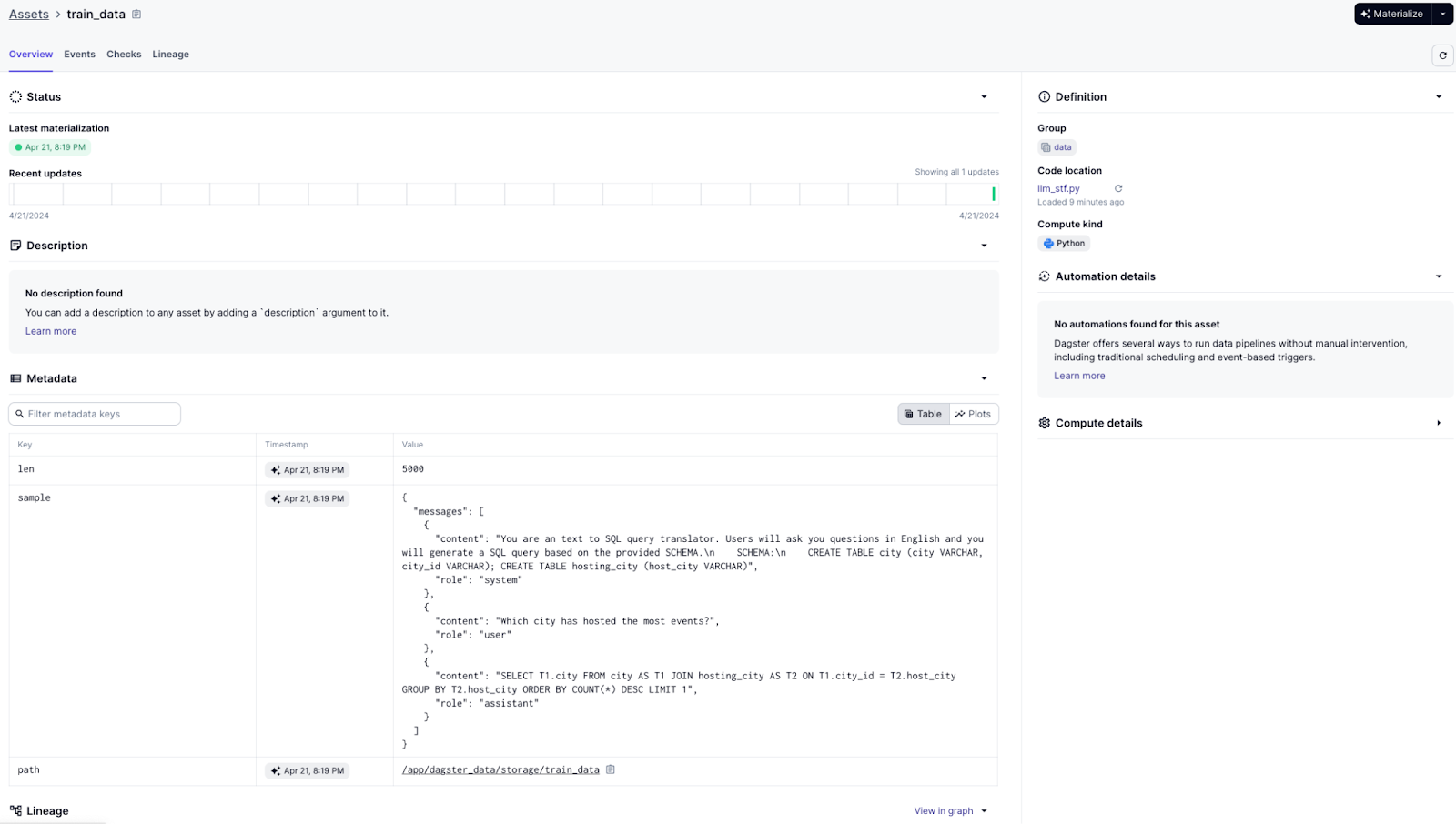
    context.add_output_metadata(
        {
            "len": MetadataValue.int(len(dataset)),
            "sample": MetadataValue.json(dataset[randint(0, len(dataset))]),
        }
    )

    return dataset
and test_data
@asset(group_name="data", compute_kind="python")
def test_data(context: AssetExecutionContext, create_text_to_sql_dataset):
    dataset = load_dataset("json", data_files=create_text_to_sql_dataset["test_path"], split="train")

    context.add_output_metadata(
        {
            "len": MetadataValue.int(len(dataset)),
            "sample": MetadataValue.json(dataset[randint(0, len(dataset))]),
        }
    )

    return dataset
Dagster also provides nice visualization for all assets — here is the final image for the data.

We also logged some metadata, so we can check it in the Dagster UI as well. For example, here is what the training_data assets look like:
So, we have the data — let’s move on to model!
Model part
Again we are going to have 1 config and 3 assets. Model config:
class ModelTrainingConfig(Config):
    pretrained_model_id: str = "meta-llama/Meta-Llama-3-8B-Instruct"
    peft_model_id: str = "text2sql-llama-3-8B"
Based on this let’s create: trained_model asset,
@asset(group_name="model", compute_kind="python")
def trained_model(context: AssetExecutionContext, config: ModelTrainingConfig, train_data):
hub_model_id = run_training(pretrained_model_id=config.pretrained_model_id, peft_model_id=config.peft_model_id, train_data=train_data)
    context.add_output_metadata({"model_url": MetadataValue.url(f"https://huggingface.co/{hub_model_id}")})
    return hub_model_id
model_card asset,
@asset(group_name="model", compute_kind="python")
def model_card(context: AssetExecutionContext, trained_model):
    model_card_path = hf_hub_download(repo_id=trained_model, filename="README.md")
    with open(model_card_path, "r") as f:
        content = f.read()

    context.add_output_metadata({"content": MetadataValue.md(content)})
    return content
and test_results assets (some code skipped to save space).
@asset(group_name="model", compute_kind="python")
def test_results(context: AssetExecutionContext, test_data, trained_model, config: ModelTrainingConfig):
    tokenizer = AutoTokenizer.from_pretrained(trained_model)
    model = AutoPeftModelForCausalLM.from_pretrained(trained_model, device_map="auto", torch_dtype=torch.float16)

    merged_model = model.merge_and_unload()
    pipe = pipeline("text-generation", model=merged_model, tokenizer=tokenizer, torch_dtype=torch.float16)

.....


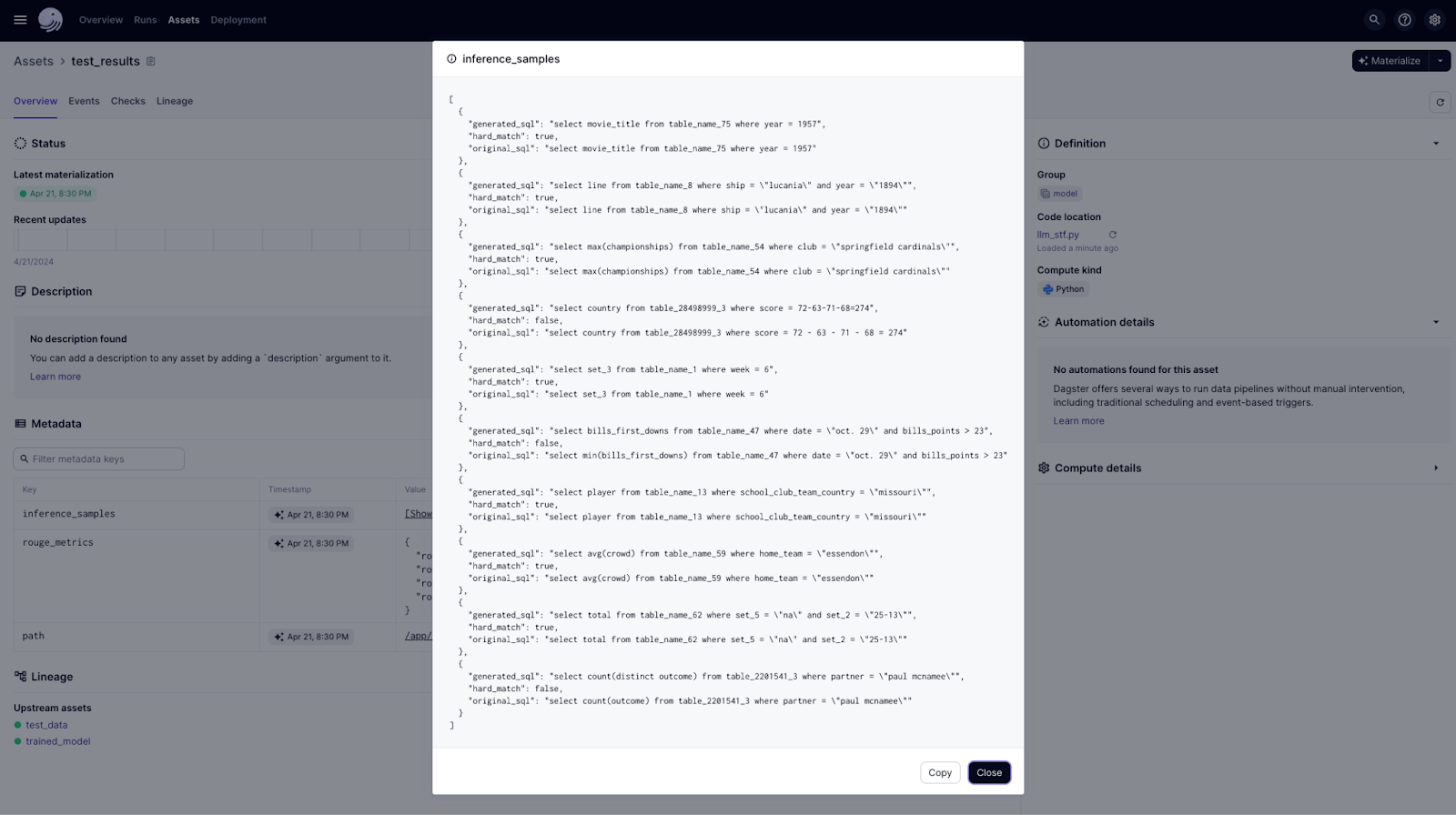
    context.add_output_metadata(
        {
            "inference_samples": MetadataValue.json(inference_samples),
            "rouge_metrics": MetadataValue.json({x: float(rouge_metrics[x]) for x in rouge_metrics}),
        }
    )
This is a visualization of all three new assets we created:

Notice we don’t have a train_model job; instead, we have a trained_model asset. How we get it doesn’t bother us; it’s up to the team that owns this asset. The only part we care about is the final results. For example, here is a detailed picture of the test_results asset with inference samples and ROUGE metrics as metadata.

Inference samples:
And to keep all of this together: here is the final visualization of our model assets!

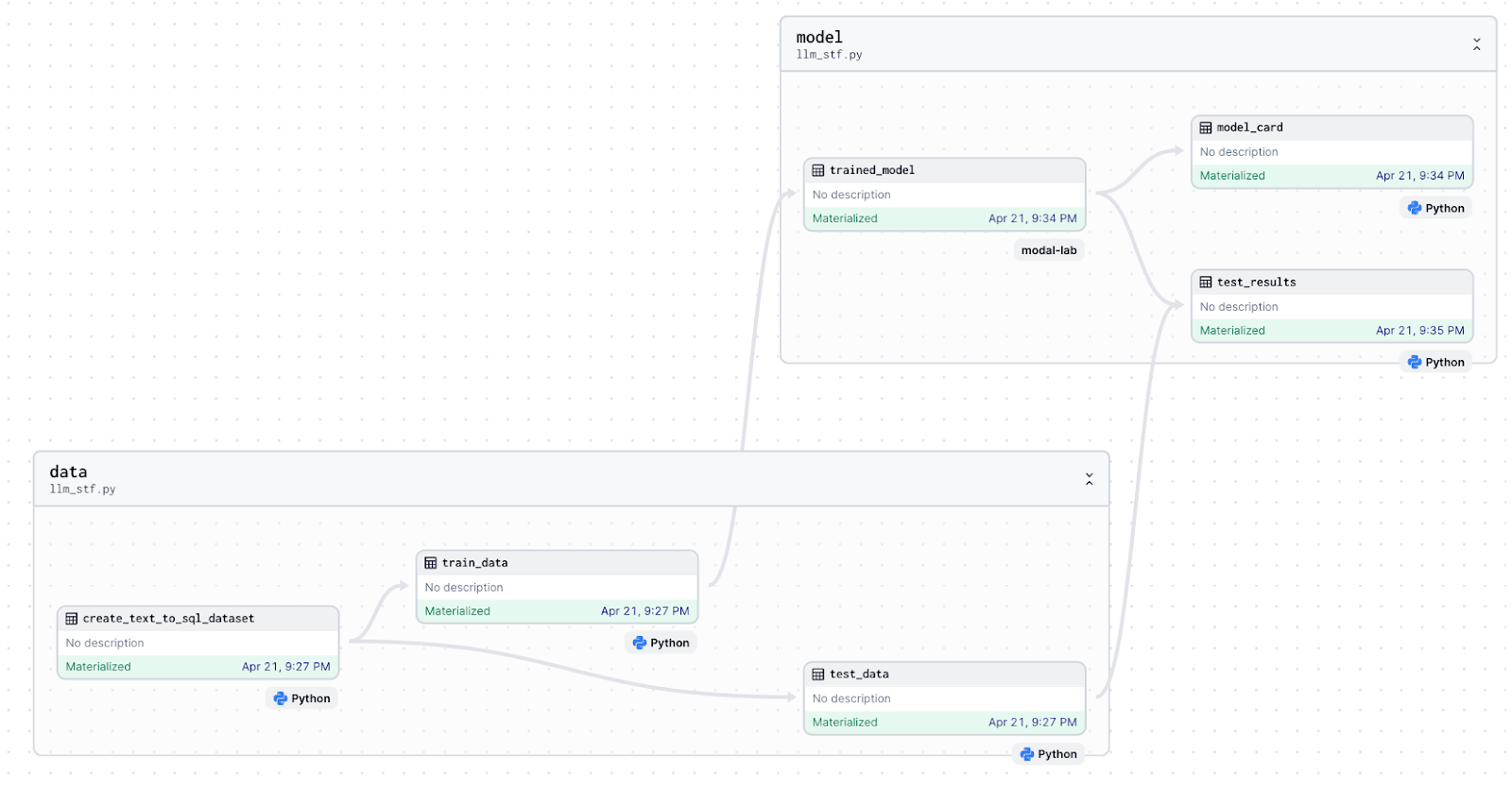
Finally at the end of this here is global asset lineage from our LLM training project:

Goal 3: Add Modal
Remember I said we don’t care how we got the trained_model artifact! Let’s put on the hat of the team that owns this and say we want a serverless and faster way of training this model, without changing any input/output.
We can switch from local training (where we need a GPU on the machine where Dagster is running) to sending our code to Modal.
For this, we need to modify one asset: trained_model like this.
@asset(group_name="model", compute_kind="modal")
def trained_model(context: AssetExecutionContext, config: ModelTrainingConfig, train_data):
    run_training_modal_function = modal.Function.lookup("fine-tune-llms-in-2024-with-trl", "run_training_modal")
    hub_model_id = run_training_modal_function.remote(
        train_data_pandas=train_data.to_pandas(),
        pretrained_model_id=config.pretrained_model_id,
        peft_model_id=config.peft_model_id,
    )
    context.add_output_metadata({"model_url": MetadataValue.url(f"https://huggingface.co/{hub_model_id}")})
    return hub_model_id
And our DAG did not change at all, but we completely changes the way we training our LLMs.
To make this work, we also need to adapt and deploy our training function to the Modal.
Adapting it looks like this:
import modal
from modal import Image
import pandas as pd
import os

app = modal.App("fine-tune-llms-in-2024-with-trl")
env = {"HF_TOKEN": os.getenv("HF_TOKEN"), "HF_TOKEN_WRITE": os.getenv("HF_TOKEN_WRITE")}
custom_image = Image.from_registry("ghcr.io/kyryl-opens-ml/fine-tune-llm-in-2024:main").env(env)


@app.function(
    image=custom_image,
    gpu="A100",
    mounts=[modal.Mount.from_local_python_packages("text2sql_training", "text2sql_training")],
    timeout=15 * 60,
)
def run_training_modal(train_data_pandas: pd.DataFrame, pretrained_model_id: str, peft_model_id: str):
    from datasets import Dataset
    from text2sql_training.llm_stf import run_training

    model_url = run_training(
        pretrained_model_id=pretrained_model_id,
        peft_model_id=peft_model_id,
        train_data=Dataset.from_pandas(train_data_pandas),
    )
    return model_url
And to deploy it, just run:
modal deploy text2sql_training/modal_training_function.pyAfter this, Dagster will be able to call training from simple Python code, but the training will happen on the Modal platform, with a UI similar to this:

There is another blog post by Philipp Schmid explaining how to do similar things with SageMaker, but I personally prefer Modal for small use cases because it seems to have better UX and a better pricing model.
Summary
So we stated from amazing code from this blog post and made 4 changes:
- Added a Dockerfile ✅
- Added Llama3 ✅
- Added Dagster ✅
- Added Modal ✅
Here are final result of all our assets:
And full code to reproduce and adapt.
Let me know if you want to see same type of implementation for “RLHF in 2024 with DPO & Hugging Face”.
Follow up
If you’ve reached this point in my blog, wow, that’s great! If you liked what you saw here and want to learn fundamentally how to build ML systems in production, check my webpage where I cover most of these topics in great detail!
Pingback: Automate Dagster with LLMs: An MCP Server Tutorial